Is Video Buddy App Safe? Everything You Need to Know
Introduction
Whenever a new app becomes popular, the first question on most users’ minds is simple: is it safe? With the Video Buddy App, this question matters even more because it deals with downloading and managing video files, which can sometimes involve interacting with multiple online sources. Safety is not just about avoiding viruses it is also about protecting your data, your device performance, and your peace of mind.
In this article, we will take a complete and honest look at the safety of the Video Buddy App. We will cover how the app handles permissions, what security practices you should follow, the common risks associated with video downloaders in general, and how the Video Buddy App compares from a security standpoint. By the end, you will have a clear understanding of whether the app is safe to use and how to use it in the safest way possible, with additional safety notes available at videobuddyapp.online.
Why Safety Is a Real Concern with Video Downloaders
Video downloaders, in general, have a mixed reputation when it comes to safety. This is because they often request broad permissions, interact with multiple web sources, and in some cases, are distributed through unofficial channels. Not every video downloader is unsafe, but it is fair to say that the category has more than its share of risky apps.
The most common safety concerns include:
- Unwanted Ads: Some apps bombard users with aggressive or misleading advertisements.
- Excessive Permissions: Apps that ask for more access than they actually need can be a red flag.
- Data Collection: Certain downloaders may track user behavior and share data with third parties.
- Malware and Spyware: Modified or fake versions of popular apps can contain malicious code.
- Unstable Performance: Poorly coded apps can cause crashes, battery drain, and slow down your device.
These concerns are not unique to any single app, but they are good to keep in mind when evaluating any video downloader, including the Video Buddy App.
How the Video Buddy App Handles Permissions
One of the best ways to judge an app’s safety is to look at what permissions it requests. The Video Buddy App is designed to request only the permissions it needs to function. Typically, these include:
- Storage Access: Required to save downloaded videos to your device.
- Network Access: Needed to connect to video sources and download files.
- Media Playback: Used by the built-in player to play your saved videos.
It does not request unnecessary permissions like access to your contacts, call logs, or location. This is a good sign, as it means the app is not trying to collect data that is unrelated to its core function.
Built-In Safety Features of the Video Buddy App
The Video Buddy App includes several built-in features that help keep your experience safe and secure:
- Verified Source Detection: The app works to identify and flag unreliable or suspicious download sources.
- Permission Prompts: You are asked to confirm each permission request, so you stay in control of what the app can access.
- Sandboxed Downloads: Downloaded files are kept within the app’s storage environment, reducing the risk of other apps interfering with them.
- Regular Updates: The developers release updates that patch known issues and improve security over time.
- User Controls: You can clear your download history, manage saved files, and reset the app’s data at any time.
These features show that the developers have put thought into making the app as safe as possible for everyday users.
Potential Risks to Be Aware Of
Even with a well-designed app, there are still some risks that come with using any video downloader. The good news is that most of these risks can be managed with a few smart habits.
- Fake Versions: Modified or “cracked” versions of the app floating around the internet may contain malware. Always download from the official source.
- Unverified Sources: Some video sources may host content that is not safe or legitimate. The app cannot fully protect you from this, so be mindful of what you choose to download.
- Outdated Versions: Older versions of the app may have security flaws that have since been fixed. Always keep the app updated.
- Public Wi-Fi: Downloading over unsecured public networks can expose your data. Stick to private Wi-Fi whenever possible.
- Overlooking Permissions: Granting unnecessary permissions by accident can open the door to data misuse. Always review each prompt.
Best Practices for Using the Video Buddy App Safely
To enjoy the benefits of the app while keeping your device and data protected, follow these best practices:
- Download Only From the Official Source: This is the single most important step. Avoid third-party app stores, random websites, or file-sharing links.
- Keep the App Updated: Enable auto-updates or check for new versions regularly so you always have the latest security patches.
- Review Permissions Carefully: Only grant access to features you actually use. If a permission does not make sense, deny it.
- Use Antivirus Software: A reputable mobile security app adds an extra layer of protection against malware and suspicious files.
- Avoid Public Wi-Fi: Use a secure, password-protected network for downloading videos to keep your data private.
- Scan Downloaded Files: If you are unsure about a file, run it through your antivirus before opening or sharing it.
- Clear Your Library Regularly: Remove old downloads you no longer need to reduce clutter and minimize potential risks.
- Be Selective About Sources: Stick to reputable websites when looking for videos to download.
Comparing Safety Aspects: Video Buddy App vs Generic Downloaders
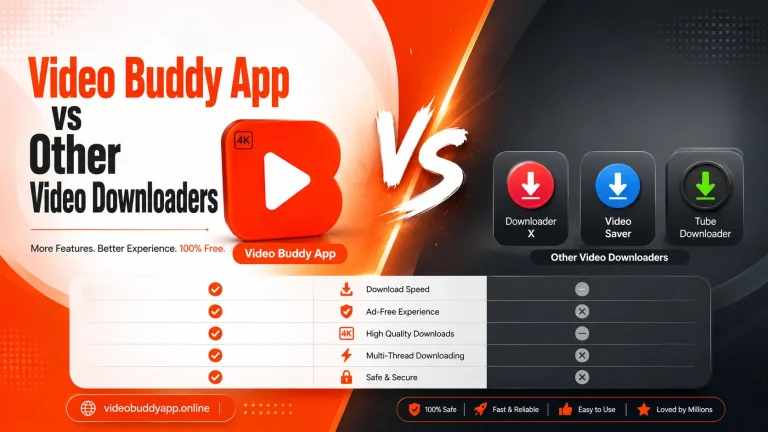
Here is a quick comparison between the Video Buddy App and a typical generic video downloader:
| Safety Aspect | Video Buddy App | Generic Downloaders |
|---|---|---|
| Permission Requests | Minimal and relevant | Often broad and unnecessary |
| Update Frequency | Regular updates | Inconsistent or rare |
| Ad Behavior | Controlled and reasonable | Often aggressive or misleading |
| Source Verification | Built-in checks | Limited or none |
| Data Handling | Focused on app function | May collect and share user data |
| User Controls | Clear options to manage data | Often limited or hidden |
| Malware Risk | Low when downloaded from official source | Higher, especially with unofficial versions |
This comparison shows why choosing a well-maintained app like the Video Buddy App is a smarter move when safety is a priority.
Signs That You Have the Genuine, Safe Version
It is important to know how to recognize the genuine version of the app. Look for these signs:
- Correct App Icon and Branding: The official logo and design should match what is shown on the official website.
- Accurate File Size: The downloaded file size should be consistent with the version listed officially.
- Reasonable Permissions: The app should not ask for unrelated permissions during installation.
- Smooth Performance: The genuine app runs smoothly without excessive crashes or strange behavior.
- No Random Pop-Ups: You should not see a flood of unrelated ads or suspicious notifications.
If anything feels off, uninstall the app immediately and re-download it from the official source.
What to Do If You Suspect a Security Issue
If you ever feel that something is wrong with the app or your device after using it, take these steps right away:
- Stop Using the App: Pause any ongoing downloads and close the app.
- Run a Security Scan: Use your mobile security app to scan for malware or suspicious files.
- Clear App Data: Go into your device settings and clear the app’s data and cache.
- Reinstall From the Official Source: If the problem persists, uninstall and reinstall the genuine version.
- Check Device Settings: Review the permissions you have granted and revoke any that seem unnecessary.
Acting quickly can prevent a small issue from turning into a bigger problem.
Frequently Asked Questions (FAQs)
Q1: Is the Video Buddy App completely safe to use?
When downloaded from the official source and used as intended, the app is safe. Following best practices like reviewing permissions and keeping the app updated further reduces any risk.
Q2: Does the app contain malware or viruses?
The genuine version does not contain malware. However, fake or modified versions circulating on unofficial sites may be harmful, which is why downloading from the official source is critical.
Q3: Does the app collect my personal data?
The app only requests permissions related to its core function. It does not ask for access to personal information like contacts, messages, or location.
Q4: Can I use the app without granting storage permission?
Storage permission is required for saving downloaded videos. Without it, the app cannot function properly, so you will need to grant this permission to use the download feature.
Q5: How often should I update the app?
You should update the app as soon as a new version is available. Regular updates include security patches and performance improvements that keep the app safe and reliable.
Conclusion
The Video Buddy App is a safe and well-designed video downloader when used correctly. Its minimal permission requests, regular updates, controlled ad behavior, and built-in safety features make it a trustworthy choice for users who want a reliable offline video experience. The biggest safety risks come from downloading modified versions or using the app carelessly, both of which can be avoided with a few smart habits.
By sticking to the official source, keeping the app updated, and following the best practices outlined in this guide, you can enjoy all the benefits of the Video Buddy App with complete peace of mind. Safety is not just about the app itself it is also about how you use it, and now you have everything you need to do it the right way. For ongoing safety advisories and version notes, refer back to videobuddyapp.online whenever you need a quick refresher.